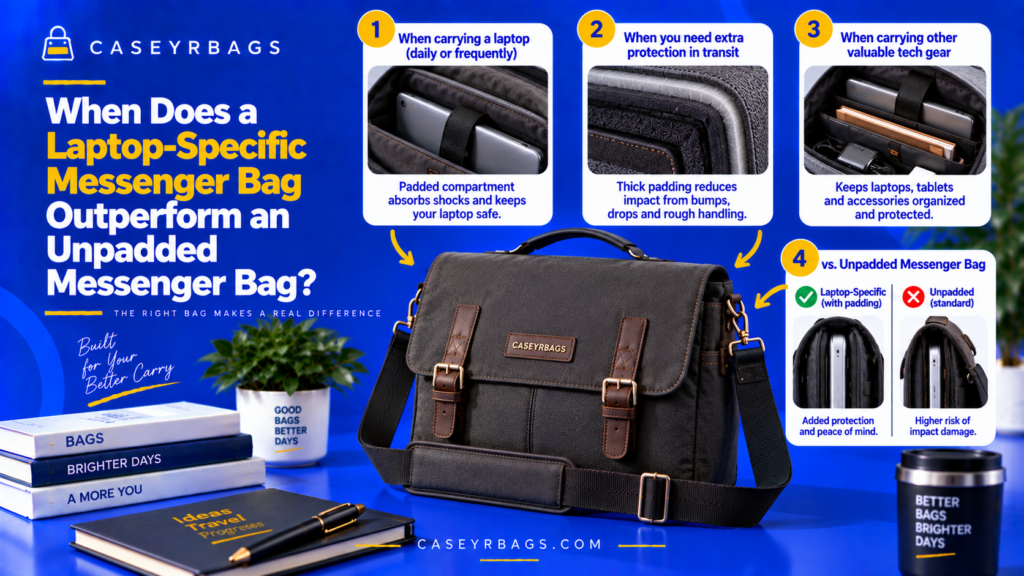
When Does a Laptop-Specific Messenger Bag Outperform an Unpadded Messenger Bag?
A Laptop-Specific Messenger Bag tends to outperform an unpadded Messenger Bag when a laptop is carried regularly and benefits from dedicated cushioning, controlled fit, bottom separation, and protection from hard accessories or shifting work items. These features can reduce direct contact and keep the device more predictably positioned during normal transport.
The advantage becomes less clear when no sensitive device is carried, when the laptop already uses an effective separate protective sleeve, or when low bulk and flexible open capacity matter more than integrated device protection. The better format therefore depends on the actual load and carrying environment rather than padding alone.
What Separates a Laptop-Specific Messenger Bag From an Unpadded Messenger Bag?
A Laptop-Specific Messenger Bag typically integrates a padded device compartment or sleeve into the bag body. This creates dedicated separation between the laptop and exterior panels, internal work items, and the base.
An unpadded Messenger Bag may still have structure, lining, pockets, dividers, or a flat device-sized zone, but it does not rely on purpose-built cushioning around the laptop. Protection therefore depends more heavily on bag material, load organization, and any separate protective case or sleeve.
The meaningful comparison is not simply foam versus no foam. It is whether the integrated padded system improves device fit, separation, and control enough to justify the additional space, thickness, and structure it occupies within the broader Messenger Bag system.
Which Features Define a Laptop-Specific Messenger Bag?
A Laptop-Specific Messenger Bag normally combines a padded sleeve, front and rear cushioning, base padding or suspension, edge coverage, device retention, and accessory separation.
These features matter because they keep the laptop inside a more controlled and cushioned zone rather than allowing it to share the main chamber freely with other contents.
What Can an Unpadded Messenger Bag Still Provide?
An unpadded Messenger Bag can still provide fabric separation, dividers, a rigid or semi-rigid body, organized work storage, and enough space for a separate laptop sleeve.
Unpadded ≠ zero protection. Its real device-carry performance depends on structure, organization, and any removable protective system added around the laptop.
Why Is Padding Alone an Incomplete Comparison?
A padded compartment can perform poorly when it is too tight, too loose, compressed by the load, or poorly separated from hard accessories.
Likewise, an unpadded bag with a well-fitted separate sleeve can provide meaningful cushioning and separation. Compare complete device-carry systems, not the presence of foam alone.
When Does Integrated Cushioning Give the Laptop-Specific Bag an Advantage?
Integrated cushioning becomes useful when the laptop regularly encounters ordinary contact that a thin lining or open compartment would not manage as effectively.
How Does Integrated Padding Reduce Direct Contact?
Integrated padding places a compressible layer between the laptop and the bag panel instead of relying only on thin fabric or lining.
Laptop → compressible layer → bag panel reduces direct hard-surface contact potential during ordinary transport.
When Does This Advantage Matter Most?
Frequent transport, repeated bag handling, normal bumps, regular set-down, and device carry alongside work items all increase the value of dedicated cushioning.
The more often these ordinary exposure conditions occur, the more useful integrated padding can become.
When Does the Cushioning Advantage Matter Less?
The advantage matters less when no laptop is carried, when the laptop already uses a robust separate sleeve, or when the bag mostly carries soft and light contents.
Integrated cushioning matters most when there is an actual device exposure problem to solve.
When Does Internal Device Separation Make the Padded Bag Better?
A dedicated device sleeve can add meaningful value when the normal work load includes hard or dense accessories that would otherwise share the laptop chamber.
How Does a Dedicated Sleeve Isolate the Laptop?
A separate padded compartment reduces direct mixing between the laptop and notebooks, tools, chargers, adapters, and other work accessories.
Separate compartment → less direct mixing → lower localized-contact potential.
Why Are Hard Accessories Especially Important?
Charger blocks, adapters, power banks, and compact electronics can create concentrated pressure when packed directly beside the device.
Hard accessories increase the value of physical separation when the alternative places them in the same open chamber.
When Can an Unpadded Bag Match This Advantage?
An unpadded bag can approach the same separation when it has clear dividers, dedicated accessory pockets, and the laptop is carried inside a protective sleeve.
Integrated separation is advantageous when the alternative leaves hard work items in direct contact with the device.
When Does Base Protection Favor the Laptop-Specific Messenger Bag?
Base cushioning or suspension becomes more valuable when the bag is regularly placed on desks, floors, vehicle surfaces, or other hard supports.
How Does Padded Base Construction Help?
A padded base places compressible material between the device edge and the outer base, reducing direct hard contact during ordinary set-down.
Device edge → padded material → outer bag base creates a softer base-contact path.
How Does a Suspended Sleeve Add Another Separation Layer?
A suspended compartment ends above the lowest bag surface so a clearance gap remains beneath the laptop.
Device compartment above outer base → bottom clearance → lower direct-base contact potential.
When Can an Unpadded Bag Remain Adequate at the Base?
An unpadded bag can remain adequate when the laptop has its own protective sleeve, the base has useful structure, and the device does not sit directly against the bottom.
Padded or suspended base ≠ drop-proof protection.
| System | Layer Path | Main Advantage | Boundary |
|---|---|---|---|
| Padded base | Laptop → cushioning → outer base | Reduced direct base contact | Not drop-proof |
| Suspended sleeve | Laptop → sleeve → clearance → outer base | Added bottom separation | Not drop-proof |
| Unpadded direct base | Laptop / sleeve → bag base | Simpler structure | Depends on added sleeve/structure |
When Does Edge & Corner Coverage Give the Padded Bag an Advantage?
Perimeter cushioning strengthens the padded bag when ordinary handling exposes laptop edges and corners to seams, side panels, or concentrated contact zones.
How Can Padded Sidewalls Reduce Edge Contact?
A padded perimeter keeps device edges separated from bag walls, seams, and nearby structure when the coverage remains continuous.
Padded sidewalls → reduced direct edge contact → more predictable device positioning.
Why Can Corner Coverage Matter During Ordinary Handling?
Corners create relatively concentrated contact zones when the bag is bumped, tilted, or set down awkwardly.
Corner coverage can reduce direct contact at those points without guaranteeing damage prevention.
When Does the Advantage Disappear?
The advantage weakens when corners remain exposed, foam has collapsed, the sleeve is badly oversized, or the laptop sits above the padded coverage.
Laptop-specific labeling is useful only when protection actually surrounds the relevant device zones.
When Does Better Device Fit Favor the Laptop-Specific Bag?
A dedicated sleeve helps most when it is dimensioned closely enough to control the laptop without forcing or pre-compressing the padded system.
How Does Controlled Sleeve Fit Reduce Movement?
A correctly sized compartment reduces free sliding and rotation while keeping the laptop inside the intended padded zone.
Correct fit → less movement → more predictable contact with the padding.
Why Can an Unpadded Open Chamber Allow More Device Movement?
More open space, fewer boundaries, and shifting surrounding contents can let a bare laptop change position during carry.
Open-chamber flexibility can become a device-control disadvantage when no separate sleeve or divider stabilizes the laptop.
Can a Poorly Fitted Padded Sleeve Be Worse Than a Well-Organized Unpadded Setup?
Yes. An oversized padded sleeve can allow movement, while an undersized sleeve can compress padding and make insertion difficult.
Correct fit matters more than the word “padded.”
| Device Storage | Movement Potential | Separation | Main Consideration |
|---|---|---|---|
| Correct padded sleeve | Low | High | Controlled fit |
| Oversized padded sleeve | Moderate–high | High | Sliding |
| Bare device in unpadded chamber | High potential | Low | Direct contact |
| Separate sleeve in organized unpadded bag | Low–moderate | High | Sleeve quality |
When Does Device Retention Strengthen the Laptop-Specific Advantage?
Retention adds value when bag movement or rotation could otherwise let the laptop migrate out of its intended padded position.
What Does Device Retention Control?
A tab or sleeve closure can reduce upward movement, limit sleeve exit, and control excessive shifting inside the device zone.
Retention → device stays within intended zone → lower unwanted migration.
Why Is Retention Useful During Messenger Bag Movement?
As the bag rotates or tilts, retention helps keep the laptop inside the padded compartment instead of allowing it to slide toward the opening.
Location control becomes more useful during repeated movement and repositioning.
Why Does Retention Not Make the Device Impact-Proof?
Retention controls position but does not eliminate severe force or create certified impact protection.
Position control ≠ impact elimination.
When Does an Unpadded Messenger Bag Create More Internal Contact Risk?
Internal contact risk rises when a bare laptop shares open space with hard or shifting work items and the bag lacks strong internal boundaries.
What Happens When Laptop and Work Accessories Share One Chamber?
Direct contact, rubbing, localized pressure, and item migration can occur as the bag moves and contents reposition.
Shared open space increases the number of possible contact paths around the device.
How Does a Dedicated Padded Sleeve Reduce That Interaction?
A physical boundary plus cushioning separates the laptop from the main chamber and reduces direct device/accessory contact.
Dedicated zone → fewer uncontrolled internal contacts.
When Is This Difference Minimal?
The difference is smaller when the unpadded bag already uses strong dividers, disciplined accessory zoning, and a separate device case or sleeve.
Unpadded ≠ zero protection when the complete load architecture is well controlled.
When Does Frequent Laptop Carry Favor the Laptop-Specific Messenger Bag?
Repeated device carry increases the value of permanent organization because the laptop needs a stable zone on most trips rather than only occasionally.
Why Does Daily or Repeated Device Carry Increase the Value of a Dedicated Sleeve?
A permanent laptop zone creates a repeatable storage position, predictable retrieval path, and less need to rebuild the protective setup each time.
Frequent laptop carry → recurring need for stable device placement → integrated architecture gains value.
How Does Integrated Organization Simplify Repeated Loading?
The laptop keeps a permanent zone while documents, accessories, and chargers use their own assigned spaces.
Permanent device zone → repeatable load architecture → simpler repeated packing.
When Does Occasional Laptop Carry Weaken the Advantage?
If the bag usually carries documents, notebooks, or non-electronic contents and a laptop appears only occasionally inside a separate sleeve, permanent padding may remain underused.
The more central the laptop is to the normal load, the more useful dedicated laptop architecture becomes.
When Does Repeated Set-Down Favor the Padded Bag?
Repeated placement on desks, floors, vehicles, and other surfaces increases the value of base cushioning or suspension during ordinary handling.
How Does Setting the Bag Down Create Device Contact?
The bag base meets the surface first, and contact can travel upward through the base structure toward the device zone.
Bag base meets surface → contact passes through base structure.
How Can Padding or Suspension Reduce Direct Transmission?
A compressible base layer, bottom clearance, and stable device compartment can reduce direct base contact around the laptop.
These features change the contact path without guaranteeing protection from severe impact.
Why Should This Not Be Described as Drop Protection?
Set-down cushioning addresses ordinary contact behavior and is not equivalent to verified protection from a drop event.
Set-down cushioning ≠ verified drop protection.
When Does Work-Item Organization Favor the Laptop-Specific Bag?
Integrated device structure becomes more useful when the normal load combines a laptop with documents, notebooks, chargers, and accessories that benefit from separate zones.
How Does a Laptop Sleeve Preserve the Main Chamber?
The laptop occupies a defined flat zone while documents and accessories use separate areas rather than competing directly with the device.
Defined laptop zone → more predictable main-chamber organization.
How Does Device Separation Help Documents?
Separating the laptop from paper items reduces direct mixing and helps documents remain in a more predictable flat orientation.
Device separation can therefore improve both electronics organization and work-item order.
When Can an Unpadded Bag Organize Work Items Equally Well?
An unpadded bag can match the organization when effective dividers are present, a separate laptop sleeve is used, and contents remain controlled.
Laptop-specific organization is an advantage only when it improves the actual load architecture.
When Does an Unpadded Messenger Bag Provide More Usable Capacity?
Integrated padding and fixed sleeve walls consume part of the bag envelope, so the unpadded format can retain more open space for non-device or irregular loads.
How Does Padding Consume Internal Volume?
Foam, sleeve walls, base structure, and dividers occupy physical space inside the bag and reduce the volume available to work items.
Integrated protection → structural displacement → less flexible internal volume.
How Can Unpadded Construction Provide More Flexible Space?
Fewer fixed padded zones can create a larger open chamber that accommodates thicker or irregular items more easily.
Open chamber → more flexible placement → less built-in device control.
When Does This Capacity Advantage Matter?
It matters when the load emphasizes thick notebooks, folders, soft accessories, non-device work items, or changing irregular contents.
More usable volume can favor the unpadded bag when device cushioning is not the main requirement.
| Feature | Laptop-Specific Padded | Unpadded Messenger |
|---|---|---|
| Device zone | Dedicated | Variable |
| Padding displacement | Higher | Lower |
| Flexible open volume | Lower potential | Higher potential |
| Device separation | Higher | Depends on organization |
| Irregular-item flexibility | More limited | Often greater |
When Does Lower Bulk Favor the Unpadded Messenger Bag?
Padding adds material thickness and fixed structure, so a low-bulk carry goal can favor the unpadded format when permanent device protection is not central.
How Does Padding Increase Bag Thickness?
Front, rear, side, and base cushioning add material layers that increase internal displacement and can increase external depth.
Protective structure therefore has a space and bulk cost.
Why Can an Unpadded Bag Pack Flatter?
Fewer foam layers, a more flexible body, and less fixed device structure can allow the bag to collapse or pack flatter around a light load.
Lower structural bulk is a functional advantage when the load does not need permanent device control.
When Does Lower Bulk Matter More Than Integrated Laptop Protection?
Lower bulk matters more when no laptop is carried, the device already has separate protection, or the main load is slim and non-device based.
Protection architecture has a space and bulk cost.
When Does an Unpadded Messenger Bag Provide Better Load Flexibility?
Fewer fixed device zones can suit users whose bag contents change substantially from one trip to another.
How Can a Fixed Laptop Sleeve Restrict Bulky Items?
A permanent sleeve divides the main chamber, can leave unused space when no laptop is present, and can limit placement of irregular contents.
Fixed organization improves repeatability while reducing some load flexibility.
How Does an Open Unpadded Chamber Adapt?
An open chamber can be reorganized for different loads, accept thicker non-device items, and provide fewer fixed boundaries.
Unpadded open chamber → greater flexible capacity ↔ less built-in device control.
When Does Flexibility Become Less Useful?
Flexibility becomes less useful when a laptop is carried frequently, carried bare, or mixed with hard accessories that need stronger separation.
Flexible capacity and device-specific control solve different carrying problems.
When Can a Separate Laptop Sleeve Make an Unpadded Messenger Bag Competitive?
A removable protective sleeve can add cushioning and device separation to an unpadded bag while preserving the option to remove that structure when the laptop is absent.
What Does a Separate Sleeve Add to an Unpadded Bag?
A separate sleeve can add cushioning, surface protection, controlled fit, and a physical boundary around the laptop.
Removable protection can therefore supply several functions otherwise built into a laptop-specific bag.
What Advantage Does Integrated Padding Still Retain?
Integrated padding keeps the device position fixed, simplifies loading, reduces extra sleeve handling, and coordinates the sleeve with the bag’s internal geometry.
Integrated protection offers convenience and permanent organization.
When Can the Removable-Sleeve Setup Be Preferable?
It can be preferable when the device is carried only sometimes, bag contents vary substantially, and removing the sleeve restores open capacity.
Integrated protection offers convenience and fixed organization; removable protection offers flexibility.
- Laptop-Specific Bag → Laptop → Built-In Sleeve → Bag
- Unpadded Bag → Laptop → Separate Protective Sleeve → Main Compartment
- Compare setup, separation, removability, and flexible space.
When Does Padding Become Too Thick or Restrictive?
Protective structure becomes a usability cost when it consumes needed capacity, compresses the device, or duplicates protection already supplied elsewhere.
How Can Excessive Padding Make Laptop Insertion Difficult?
A thick sleeve can become tight, keep foam pre-compressed, and make device insertion or removal unnecessarily difficult.
More padding can weaken usability when it leaves insufficient functional clearance.
How Can Padding Reduce Document or Accessory Space?
More protective material occupies more of the internal envelope and leaves less space for documents, notebooks, or accessory zones.
More protective material → less available internal volume.
When Does the Unpadded Bag Become the More Functional Format?
The unpadded format becomes more functional when integrated padding is unnecessary, consumes needed volume, creates excess bulk, or duplicates an effective separate sleeve.
Protection that solves no active device-carry problem can become unnecessary structure.
When Does an Unpadded Messenger Bag Outperform the Laptop-Specific Bag?
The unpadded format can outperform when permanent device structure is not solving a recurring need and flexibility, open capacity, or lower bulk matters more.
When No Laptop or Sensitive Device Is Carried, What Advantage Does Unpadded Structure Provide?
Lower bulk, greater flexible volume, and simpler internal architecture become direct functional benefits when no sensitive device requires a permanent padded zone.
Unused protective structure then consumes space without solving an active device-carry problem.
When Does a Separate Protective Sleeve Reduce the Need for Integrated Padding?
When a removable sleeve already provides appropriate fit, cushioning, and separation and the bag organizes the remaining load well, the integrated sleeve may add less value.
Separate protection ≠ automatically inferior protection.
When Do Variable or Bulky Loads Favor Unpadded Space?
Irregular items, changing loads, and thicker non-device contents can benefit from a larger open chamber with fewer fixed padded boundaries.
The unpadded format can outperform when flexible capacity matters more than permanent laptop-specific structure.
When Does the Laptop-Specific Messenger Bag Clearly Provide More Value?
The padded architecture provides more value when a laptop is central to the normal load and repeatedly benefits from correct fit, cushioning, separation, and movement control.
When Is Device Carry Central to the Normal Load?
Strong padded value appears when the laptop is carried regularly, is central to work use, and shares the bag with other work items.
Frequent device carry makes the dedicated zone useful on most trips rather than occasionally.
When Is the Device Exposed to Repeated Ordinary Contact?
Frequent transportation, repeated set-down, dense accessory loads, and bag movement increase the number of ordinary contact situations the integrated system can help manage.
Repeated exposure makes consistent padding and separation more functionally relevant.
Which Combination Creates the Strongest Padded-Bag Case?
Frequent laptop carry, correct dedicated fit, useful padding coverage, base separation, hard-accessory separation, and controlled retention create the strongest padded use case.
Integrated protection ≠ universal superiority; the advantage exists when these features solve recurring problems in the actual load.
How Does Overfilling Change the Comparison?
Overfilling can erase the advantages of either design by compressing the padded sleeve, crowding the open chamber, and forcing the closure.
How Does Overfilling Compress the Padded Sleeve?
Other contents can press inward, leaving padding pre-compressed and reducing the functional cushioning space around the device.
Padded bag overfilled → sleeve compressed → protective margin declines.
How Can Overfilling Make an Unpadded Bag Equally Problematic?
A bare laptop can become squeezed between contents, hard objects can press into it, and the closure can become strained.
Unpadded flexibility does not solve overpacking when the device zone becomes crowded.
Why Does Neither Bag Type Compensate for Excessive Loading?
Both architectures depend on functional packed capacity so compartments, separation, and closure can work as intended.
Bag type ≠ permission to overfill, and protection architecture works best within functional packed capacity.
How Does Laptop Fit Change Which Bag Performs Better?
Correct device fit can reverse the apparent advantage because a poorly fitted integrated sleeve may perform worse than a well-fitted removable system.
What if the Laptop-Specific Sleeve Is Too Tight?
An undersized padded sleeve can keep foam compressed, make insertion difficult, and create continuous pressure around the device.
Tight fit weakens the expected padded advantage even though cushioning material is present.
What if the Padded Sleeve Is Too Loose?
Excess space can allow movement, poor alignment, and weaker edge positioning inside the compartment.
Loose fit weakens controlled positioning and can make padding contact less predictable.
What if the Unpadded Bag Plus Separate Sleeve Fits the Device Better?
A well-fitted removable sleeve can outperform a poorly fitted integrated compartment for that specific laptop.
The comparison should remain neutral and device-specific rather than favoring one label.
How Can Padded vs Unpadded Performance Be Evaluated?
The comparison should use the actual laptop, normal case, normal work load, and intended separate sleeve rather than empty bags or marketing labels.
What Should Be Checked in the Laptop-Specific Messenger Bag?
Inspect padding coverage, sleeve dimensions, base construction, retention, accessory separation, and remaining capacity after the normal laptop load is inserted.
These checks show whether the padded architecture is solving device-carry needs without creating excessive capacity loss.
What Should Be Checked in the Unpadded Messenger Bag?
Inspect the device zone, dividers, bag structure, separate sleeve compatibility, accessory separation, and flexible capacity.
Unpadded performance should be evaluated as a complete system rather than assumed to provide no device protection.
Which Sequence Should Determine Which Format Better Fits the Use Case?
- Identify whether a laptop is part of the normal load.
- Verify the laptop’s actual dimensions.
- Include its normal case where used.
- Inspect the padded bag’s sleeve fit.
- Inspect its front, rear, side, and base coverage.
- Load normal documents and accessories.
- Check hard-object separation.
- Observe packed thickness.
- Repeat the normal load in the unpadded bag.
- Add the actual separate laptop sleeve if that is the intended setup.
- Compare device movement.
- Compare closure.
- Compare usable remaining capacity.
- Compare retrieval.
- Choose based on the actual load pattern rather than padding label alone.
Use the sequence in order so laptop frequency, actual dimensions, case, padded-sleeve fit, coverage, and normal work items are established before the unpadded setup is tested.
Then add the intended separate sleeve, compare movement, closure, remaining capacity, and retrieval, and choose from the actual load pattern rather than the padding label.
How Can Padded-vs-Unpadded Messenger Bag Mismatches Be Avoided?
Mismatches are avoided by rejecting universal rules and checking whether either architecture actually fits the device, work load, protection setup, and capacity needs.
Why Is “Padded Is Always Better” a Weak Rule?
Padding consumes space, can add bulk, can fit poorly, and can remain unnecessary when no device is carried or a separate sleeve already solves the protection need.
Integrated protection is useful only when its benefits exceed its structural cost for the actual load.
Why Is “Use a Separate Sleeve in Any Bag” Also Incomplete?
A removable sleeve can still shift, surrounding accessories can press against it, base support can vary, and the bag may lack a stable device position.
Separate protection can be effective, but the complete setup still needs evaluation.
What Should Be Verified Before Deciding Which Format Fits Better?
Verify laptop frequency, actual dimensions, case, sleeve fit, padding coverage, base behavior, retention, accessory separation, packed profile, closure, and retrieval in both setups.
Also compare remaining capacity, added bulk, flexible load needs, and whether a removable sleeve changes the result before making the final fit decision.
- Laptop use frequency is identified.
- Actual laptop dimensions are verified.
- Normal protective case is included where used.
- Padded sleeve fits without forcing.
- Padded sleeve is not excessively loose.
- Padding covers relevant front/rear surfaces.
- Edge and corner coverage are considered.
- Base padding or suspension is inspected.
- Padding is not treated as drop-proofing.
- Device retention is evaluated.
- Hard accessories remain separated from the laptop.
- Surrounding work contents do not compress the sleeve excessively.
- Padding displacement from usable capacity is considered.
- Added bag bulk is considered.
- Remaining document space is evaluated.
- Remaining accessory space is evaluated.
- Unpadded bag structure is evaluated rather than assumed to provide no protection.
- Separate laptop sleeve is included in the comparison where relevant.
- Removable sleeve fit is evaluated.
- Device movement is compared between both systems.
- Base contact is compared.
- Packed profile is compared.
- Closure remains natural in both setups.
- Neither bag is overfilled.
- Laptop-specific labeling is not treated as verified protection.
- More padding is not automatically treated as better.
- Unpadded structure is not automatically treated as inadequate.
- Final choice is based on the actual device/work-item load and carry environment.
Conclusion
A Laptop-Specific Messenger Bag generally outperforms an unpadded Messenger Bag when a laptop is carried regularly and the integrated sleeve provides correct fit, meaningful cushioning, base or edge separation, movement control, and isolation from hard work accessories. In those conditions, the padded architecture solves device-carry problems that an ordinary open compartment may leave unmanaged.
A Laptop-Specific Messenger Bag provides the clearer advantage when device protection and stable laptop organization are recurring needs; an unpadded Messenger Bag can remain the more functional choice when device carry is occasional, protection is supplied by a well-fitted removable sleeve, or flexible capacity and lower bulk matter more than permanent padded structure.
FAQs
Not automatically. A padded bag gains a meaningful advantage only when the sleeve fits correctly, cushioning covers useful zones, and the laptop remains separated from hard contents.
A poorly fitted padded sleeve may perform less effectively than an organized unpadded bag using an appropriate protective sleeve.
Yes. A separate sleeve can add cushioning, separation, and controlled fit around the laptop inside an unpadded Messenger Bag.
The complete setup should still be checked for device movement, hard-accessory contact, base support, sleeve fit, and normal closure. This does not guarantee protection from severe impacts.
An unpadded format may be more functional when no laptop is normally carried, removable protection already addresses the device need, or the load changes frequently.
It can also suit users who value lower bulk and greater open capacity more than permanent laptop-specific structure.