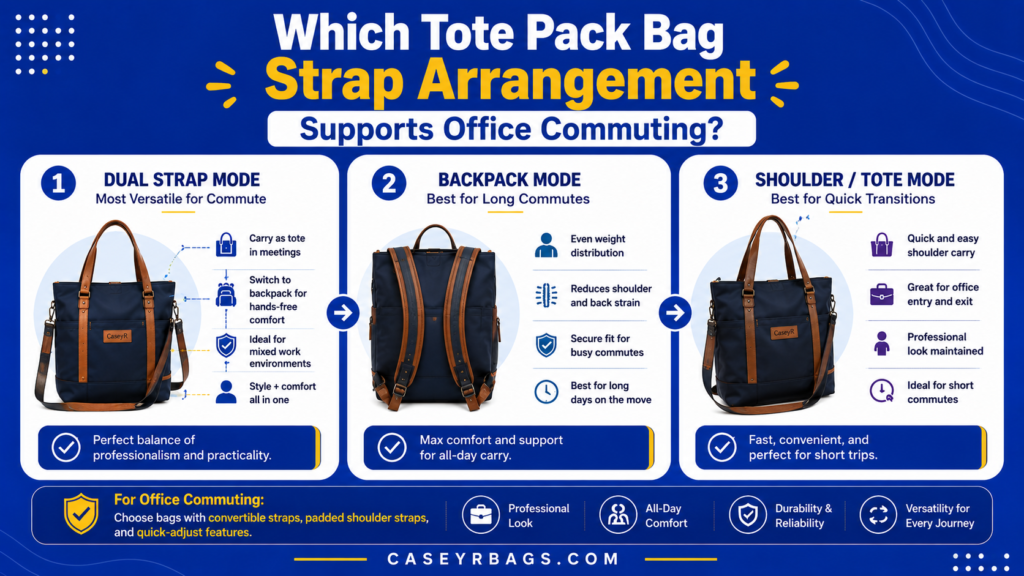
Which Tote Pack Bag Strap Arrangement Supports Office Commuting?
A Tote Pack Bag supports office commuting best when its Backpack straps provide stable sustained carry while its Tote handles remain easy to use for short transitions, lifting, office entry, and workplace handling. Strap adjustment, upper and lower anchors, handle position, stowage, and conversion hardware determine whether each carry mode works cleanly during walking, transit, and indoor movement.
More strap options ≠ better commuting arrangement, and convertible carry ≠ efficient carry transition. The strongest setup depends on the actual commute, normal office load, movement duration, transition frequency, and access needs. Backpack straps may dominate longer movement, while Tote handles can become more useful at building entrances, security desks, elevators, desks, and other short handling phases where quick repositioning matters more than sustained back carry.
What Strap Arrangement Does a Tote Pack Bag Need for Office Commuting?
An office-commute Tote Pack needs a strap arrangement that supports sustained movement through Backpack carry while preserving quick Tote handling for office entry, lifting, desk use, and short indoor transitions. Walking and transit place greater value on stable two-strap carry, while workplace movement often requires faster repositioning.
Backpack straps and Tote handles therefore perform different commute roles. Upper and lower Backpack anchors create the active two-strap path for longer movement, while accessible Tote handles support short lifts, set-downs, and rapid changes in carry position. The broader Tote Bag structure provides the parent context for this office-commute strap question.
The strongest arrangement supports repeated transitions without unnecessary adjustment, dangling hardware, or blocked access. Fixed, stowable, partly detachable, and removable systems can all work when inactive components remain controlled and the main opening stays usable. The correct arrangement matches the actual commute rather than simply providing more strap options.
Which Strap Components Directly Affect Office-Commute Performance?
The components that most directly affect office-commute performance are the Backpack shoulder straps, Tote handles, upper anchors, lower anchors, strap adjusters, clips or buckles, storage sleeves, and any padding integrated into the active strap system. Each part influences whether the bag can move cleanly between sustained walking and short workplace handling.
Strap component → carry effect → commuting consequence. Adjusters change bag position, anchors define the Backpack load path, storage zones control inactive webbing, and Tote handles determine how quickly the bag can be lifted or repositioned indoors. No single component proves commuter fit unless the complete arrangement works together through the actual commute sequence.
How Should Tote & Backpack Carry Divide Their Commuting Roles?
Backpack carry usually has the clearest role during longer movement because two active shoulder straps can keep the Tote Pack closer to the back and reduce some free swing during walking or transit. Tote carry becomes useful for short transitions, quick lifting, elevators, security desks, desk placement, and movement between nearby indoor locations.
This is a functional pattern, not a universal rule. A short commute may rely mostly on Tote handles, while a walking-heavy route may use Backpack mode for nearly the entire journey. The best division depends on duration, load, access frequency, and how often the user changes mode rather than on assuming one carry system is always superior.
Why Does One Strap Arrangement Not Fit Every Office Commute?
One strap arrangement does not fit every office commute because walking distance, transit use, office load, indoor movement, access frequency, and carry-mode transition frequency vary from one routine to another. A commuter who walks for a long period may value rapid Backpack activation and stable adjustment more than someone whose movement is mainly between a car, elevator, and desk.
Different commute patterns → different strap priorities. A mixed transit routine may benefit from quick Tote/Backpack switching, while a Tote-dominant routine may care more about easy handles and controlled inactive straps. Fit should therefore be judged from the real commute pattern rather than from generic versatility claims.
How Should Backpack Straps Be Arranged for Office Commuting?
Backpack straps should support stable repeated commuting through usable adjustment, reliable attachment, and controlled inactive positioning without adding unnecessary conversion complexity.
How Does Strap Adjustment Affect Commuting Fit?
Strap adjustment affects commuting fit by changing the Tote Pack’s position relative to the back and controlling how evenly the left and right strap paths support the bag. Adjustment range matters because clothing layers, load volume, and carrying position can change across the day, making one fixed setting less practical for repeated use.
Adjustment → bag position → carry stability. The system should allow both straps to reach a consistent working position without requiring repeated major rethreading or creating large loose sections. A wider adjustment range can improve adaptability, but it does not make every load or commute automatically suitable.
How Do Fixed & Detachable Backpack Straps Differ?
Fixed Backpack straps remain attached and ready for immediate use, which reduces connection steps when the commuter needs to switch from Tote mode into sustained back carry. The trade-off is that the straps remain physically present during Tote use and therefore require good inactive positioning or stowage.
Detachable straps can create a cleaner Tote mode by removing unused webbing, but they add attachment steps and require the correct anchors to remain obvious. Neither arrangement is universally superior. Fixed systems favor rapid activation, while detachable systems favor cleaner inactivity. The better choice depends on how often Backpack mode is used and how much transition friction the routine can tolerate.
When Are Stowable Backpack Straps Useful?
Stowable Backpack straps are most useful when inactive webbing would otherwise dangle, drag, catch on surrounding objects, obstruct Tote carry, or interfere with desk and workplace handling. A storage sleeve or dedicated panel can keep the straps attached while removing them from the active Tote-mode path.
Strap storage is useful when inactive straps create a real problem. If exposed fixed straps already remain flat, controlled, and clear of the opening, dedicated stowage may add little value while introducing another conversion action. Stowability should therefore solve observed interference rather than be treated as a mandatory commuter feature.
| Strap Arrangement | Commute Benefit | Main Trade-Off | Best Fit |
|---|---|---|---|
| Fixed exposed | Immediate Backpack use | Inactive straps remain visible | Frequent back carry |
| Fixed stowable | Quick use + cleaner Tote mode | Added storage structure | Mixed-mode commute |
| Partly detachable | Flexible control | Extra conversion step | Moderate switching |
| Fully removable | Cleanest Tote mode | Slowest reconfiguration | Infrequent Backpack use |
How Should Tote Handles Be Arranged for Office Commuting?
Tote handles should support quick lifting, short indoor carry, and workplace repositioning without obstructing the opening or interfering with Backpack straps.
Which Tote-Handle Length Best Supports Office Transitions?
Short Tote handles favor direct hand carry, quick lifting, and desk movement because the bag can be picked up with minimal loose handle material near the opening. Longer handles may allow additional forearm or shoulder use during short transitions, which can be useful when the commuter needs flexibility between nearby indoor locations.
No universal handle length is best. Short handles can simplify hand carry but provide less shoulder flexibility, while longer handles create more options but may cross the opening or interact with Backpack straps. The best length is the one that supports the actual office transition pattern without compromising access or inactive-component control.
How Does Handle Placement Affect Bag Access?
Handle placement affects bag access because the handles sit close to the primary opening and can either preserve or interfere with the path used to reach work items. Poorly positioned handles can collapse a broad opening, cross a zipper path, cover a pocket, or tangle with Backpack straps during conversion.
Handle placement → opening clearance → workplace access. The strongest arrangement keeps the handles easy to grab while allowing the main compartment and important pockets to open normally. A handle should not need to be repeatedly moved out of the way simply to use the bag’s primary storage during ordinary office handling.
When Should Tote Handles Remain Accessible in Backpack Mode?
Tote handles should remain accessible in Backpack mode when the commute includes frequent short transitions such as leaving transit, climbing stairs, passing security desks, entering elevators, moving through an office, or placing the bag beside a workspace. Accessible handles allow the user to lift or reposition the Tote Pack without completing a full mode change first.
Easy to grab ≠ uncontrolled or dangling. The handles can remain exposed if they stay clear of the Backpack straps, opening, and body position. The goal is immediate short-movement utility without turning inactive handles into another source of interference.
| Handle Trait | Carry Position | Transition Benefit | Access Effect | Possible Trade-Off |
|---|---|---|---|---|
| Short handles | Hand carry | Fast lift / desk move | Often clear of opening | Less shoulder flexibility |
| Longer handles | Hand / forearm / shoulder | More short-carry options | Can cross upper opening | More inactive handle material |
| Low-profile resting handles | Inactive in Backpack mode | Easy grab after removal | Reduced strap conflict | Must still remain reachable |
| Rigid upright handles | Immediate grab | Fast transition | May sit near zipper path | Potential opening interference |
How Should Tote Pack Straps Switch Between Commute Modes?
Tote Pack straps should switch between commute modes through a clear reversible sequence that controls inactive straps and avoids unnecessary repeated setup.
How Many Conversion Steps Are Practical for Repeated Commuting?
The practical number of conversion steps depends on how often the commuter must loosen, unclip, retrieve stored straps, attach anchors, adjust strap length, and control inactive handles. A frequent mixed-mode commute places greater value on a sequence that can be repeated without rethreading or several small hardware actions each time.
Repeated commute transition → fewer unnecessary steps, but fewest possible steps ≠ automatically best. A slightly longer sequence can be stronger when each step is obvious and produces a cleaner final mode. The correct measure is whether conversion remains predictable and reversible under normal daily use.
How Should Inactive Straps Be Controlled?
Inactive straps should move into a predictable position where they do not dangle, drag, tangle with Tote handles, block the opening, or interfere with desk placement. Common control methods include stowage sleeves, retention loops, flat resting positions, detachable anchors, and controlled folding that keeps unused webbing close to the bag body.
Inactive strap → controlled position → no interference. Complete concealment is not always required; exposed straps can work when they remain flat and out of the active Tote path. The purpose of storage or retention is functional control, not simply a cleaner appearance.
When Does Conversion Complexity Become a Commuting Weakness?
Conversion complexity becomes a commuting weakness when the user must repeatedly rethread webbing, manage several small clips, correct twisted straps, search for difficult anchor points, move hardware away from the opening, or follow a long sequence before the second mode becomes usable. These actions add friction each time the commute changes context.
Useful convertibility should reduce friction, not move it into the conversion process. Complexity is most problematic when switching happens frequently. A system with more steps can still work if those steps are clear, quick to reverse, and free from repeated correction or access obstruction.
How Does Office Load Affect Tote Pack Strap Arrangement?
Office load affects Tote Pack strap requirements because denser work-item loads increase the importance of stable carry, controlled load position, and an appropriate division between Tote and Backpack modes.
How Does a Laptop-and-Essentials Load Affect Strap Needs?
A normal office load can include a laptop or tablet, charger, documents, water bottle, and small personal items. These items can create a denser and less compressible load than light everyday contents, increasing the value of a controlled two-strap Backpack system during longer walking or transit segments.
Denser normal work load → greater value of controlled two-strap carry during sustained movement. This does not establish a safe load limit or make Backpack mode universally necessary. The decision still depends on total load, duration, transition frequency, and how effectively the Tote handles and Backpack straps share different phases of the commute.
Why Does Load Distribution Matter in Backpack Mode?
Load distribution matters in Backpack mode because centered contents create a more predictable bag position while off-center dense items can make the body tilt or create uneven demand between the left and right strap paths. The same total load can therefore behave differently depending on where heavier work items sit inside the Tote Pack.
Centered load → more predictable carry, while uneven load → bag tilt / strap imbalance. This is a mechanical observation rather than a medical claim. The strap system should be evaluated with the normal office load in its actual working position rather than with the bag empty or artificially balanced.
When Can Tote Mode Become Less Practical for the Same Office Load?
Tote mode can become less practical when the same office load must be carried for longer periods, when bag swing increases, when handle contact becomes more demanding, or when repeated hand switching is needed to maintain the carry position. A load that works well for a short elevator-to-desk transition may be less suitable for a long walk.
Same bag + same office load can behave differently in Tote and Backpack modes. The deciding factors are duration, movement, access needs, and the actual handle/strap configuration. Tote mode is not inherently weak; it simply serves a different carry role within many office-commute routines.
| Load Pattern | Carry Duration | Backpack-Strap Need | Tote-Handle Role | Main Check |
|---|---|---|---|---|
| Light office essentials | Short | Optional / situational | Frequent quick handling | Does Tote mode stay practical? |
| Dense work-item load | Moderate | Higher value | Short transitions | Does Backpack position stay stable? |
| Mixed load + transit | Variable | Useful for sustained segments | Important during transitions | Can modes switch quickly? |
| Walking-heavy work load | Longer | Primary carry role | Secondary indoor role | Are adjustment and control reliable? |
How Does Strap Arrangement Affect Office Access?
Strap arrangement affects office access by determining whether active and stored carry components remain clear of the main opening, work-item compartments, and quick-access zones.
How Can Backpack Straps Affect Main-Compartment Access?
Backpack straps can affect main-compartment access when their active or stored position crosses a zipper path, compresses the opening, covers a side-access panel, or places loose webbing over the area used to reach the main load. A well-routed strap system keeps the active carry path separate from the intended retrieval path.
Strap position → opening clearance → access consequence. The strongest arrangement does not require the commuter to undo unrelated shoulder-strap hardware before opening the bag. Stored straps should also remain clear of the opening so a cleaner Tote mode does not create hidden access friction.
How Can Tote Handles Improve Quick Office Access?
Tote handles improve quick office access by giving the user an immediate way to lift, rotate, or reposition the bag before setting it on a desk or opening the main compartment. This can reduce the need to manipulate Backpack straps during short indoor transitions where the bag is repeatedly moved between floor, chair, desk, or hand carry.
The benefit depends on handle placement and opening clearance. Handles should remain easy to grab without collapsing the opening or covering important work-item pockets. Quick Tote handling supports access only when the handles and inactive Backpack components stay out of the retrieval path.
Why Should Strap Storage Not Block Work-Item Access?
Strap storage should not block work-item access because a stowage sleeve or folded strap bundle can create new friction if it covers the laptop compartment, document sleeve, primary opening, or frequently used quick-access pockets. The storage system should remove unused webbing from the active carry path without taking over another important functional zone.
Clean strap storage should not create hidden access friction. A storage feature is only useful when it controls inactive straps while preserving the compartments that matter during the office routine. Otherwise, the commuter simply trades visible strap interference for slower retrieval.
Which Strap Arrangement Best Fits Different Office Commutes?
The best Tote Pack strap arrangement is the one that matches the commute’s walking duration, transit pattern, office load, carry-mode transition frequency, and workplace handling needs.
What Works Best for Walking-Heavy Office Commutes?
Walking-heavy office commutes place the highest value on a stable Backpack system that remains easy to adjust and keeps the bag in a predictable position during sustained movement. Both straps should activate cleanly, remain similarly adjusted, and avoid unnecessary loose sections that shift while walking.
Tote handles still matter for short indoor transitions after the walking segment ends. They should stay controlled in Backpack mode yet remain easy to grab at building entry, elevators, or the desk. A walking-heavy fit therefore combines dependable Backpack carry with secondary Tote handling rather than eliminating the Tote function.
What Works Best for Mixed Transit-and-Office Commutes?
Mixed transit-and-office commutes benefit from a strap arrangement that changes roles quickly: Backpack carry during walking or station movement, followed by easy Tote handling during vehicle entry, office transitions, or desk placement. Fixed stowable or otherwise well-controlled straps can be useful when they reduce the need for repeated detachment.
Transit movement → Backpack carry → office transition → Tote handling. The strongest system keeps grab handles accessible, controls inactive Backpack straps, and preserves predictable opening access after each switch. The exact strap type matters less than whether the transition is repeatable without tangling, searching for anchors, or moving hardware away from the opening.
Which Strap Criteria Should Be Verified Before Choosing a Tote Pack for Commuting?
- Identify the normal office load.
- Estimate the walking portion of the commute.
- Identify transit use.
- Determine carry-mode change frequency.
- Check Backpack-strap adjustment.
- Check Tote-handle length and placement.
- Verify inactive-strap control.
- Test main-compartment access.
- Check the conversion sequence.
- Confirm both modes remain practical for the same normal load.
Choose the arrangement only after testing the normal office routine rather than an isolated feature. The strongest commute fit keeps Backpack carry stable during the longest movement phase, makes Tote handles useful during short workplace transitions, and preserves access after conversion. It should also reverse cleanly without repeated strap correction or unnecessary hardware handling. If a feature is rarely used but adds persistent interference, the simpler arrangement may provide the better office-commute fit even when it offers fewer total carry options.
| Commute Pattern | Normal Load | Walking Duration | Transition Frequency | Strap Arrangement | Commute Fit |
|---|---|---|---|---|---|
| Walking-heavy | Moderate / dense | Longer | Low–moderate | Stable adjustable Backpack + accessible Tote handles | Backpack-dominant |
| Mixed transit | Moderate | Variable | High | Quick-switch straps + controlled inactive components | Mixed-mode |
| Short car-to-office | Light–moderate | Short | Low | Simple Tote handling + available Backpack option | Tote-dominant |
| Conditional routine | Variable | Variable | Variable | Arrangement with one known compromise | Conditional |
How Can Tote Pack Strap Mismatches Be Avoided During Office Commuting?
Tote Pack strap mismatches are avoided by evaluating the actual commute pattern, work load, carry transitions, inactive-component control, and access rather than judging commuter suitability from strap count alone.
Why Is Choosing a Tote Pack From Strap Count Alone a Mistake?
Strap count does not reveal adjustment quality, anchor placement, stowage, inactive-strap control, access interference, or how quickly the bag can change from Backpack to Tote handling. A design can appear highly versatile because it shows several straps and handles while still creating repeated setup or obstruction during the actual office routine.
More straps ≠ better office commuting. The meaningful question is whether the active straps support the needed movement phase and whether inactive components stay controlled when their role ends. A simpler arrangement can outperform a feature-heavy one when it creates fewer transition and access problems.
Why Can Poor Strap Storage Make Office Use Frustrating?
Poor strap storage can make office use frustrating when inactive Backpack straps dangle, tangle with Tote handles, contact the floor, block the opening, interfere with desk placement, or slow the next carry transition. These problems are practical rather than aesthetic because they repeatedly interrupt normal handling and retrieval.
Storage should place unused straps where they remain predictable and clear of the active Tote path. If a storage system requires excessive folding or blocks another compartment, it has simply moved the interference. The strongest control method is the one that solves the actual workplace problem with the least additional handling.
What Should Be Verified Before Relying on a Tote Pack for an Office Commute?
- Normal office load is identified.
- Backpack straps are structurally integrated.
- Strap adjustment supports normal carry.
- Both Backpack straps adjust evenly.
- Tote handles support intended short carry.
- Tote handles remain easy to grab.
- Inactive Backpack straps remain controlled.
- Inactive Tote handles do not obstruct Backpack mode.
- Conversion avoids unnecessary steps.
- Main opening remains usable in both modes.
- Work-item compartments remain accessible.
- Bag orientation remains stable after conversion.
- Walking-heavy portions can use Backpack mode effectively.
- Short office transitions can use Tote mode efficiently.
- Strap system solves the actual commute rather than adding unused features.
Run the checklist with the normal office load and the real commute sequence. Check sustained walking, transit entry or exit, office arrival, short indoor movement, and desk placement rather than evaluating the bag in only one carry mode. If adjustment repeatedly slips, inactive straps obstruct access, conversion takes unnecessary steps, or one mode becomes impractical for the same load, revise the strap setup or reconsider the arrangement before treating it as a strong commute fit.
These are qualitative commute-fit outcomes, not universal comfort, medical, or safe-load ratings.
Conclusion
The Tote Pack Bag strap arrangement that best supports office commuting combines a stable adjustable Backpack system for sustained movement with accessible Tote handles for short transitions, workplace handling, and quick repositioning. Adjustment, strap storage, handle placement, carry conversion, office load, and opening access all determine whether those two systems divide the commute effectively.
More strap options ≠ better commuting arrangement, convertible carry ≠ efficient carry transition, and office suitability ≠ appearance alone. CaseyrBags evaluates Tote Pack office-commute strap systems by how effectively they support sustained movement, quick workplace transitions, controlled inactive components, and practical access for the actual routine. The strongest arrangement keeps Backpack straps useful for longer movement, Tote handles useful for short handling, and inactive components controlled without interfering with access or conversion.
FAQs
They can be useful when inactive straps would otherwise dangle, interfere with Tote carry, complicate desk placement, or obstruct workplace handling. Stowage is not mandatory when fixed straps already remain controlled and clear of the opening. The better system is the one that solves real interference without adding unnecessary conversion steps.
Not always. Longer handles can provide additional short shoulder-carry flexibility, while shorter handles may simplify hand carry, lifting, and desk handling. The better length depends on how often Tote mode is used, whether the handles clear the main opening, and whether they remain controlled during Backpack carry.
No. Fixed, stowable, partly detachable, and removable Backpack straps can all work for commuting. Detachable systems can create a cleaner Tote mode but add reconnection steps. The stronger arrangement is the one that supports reliable Backpack carry while keeping inactive straps controlled and workplace access practical during Tote use.