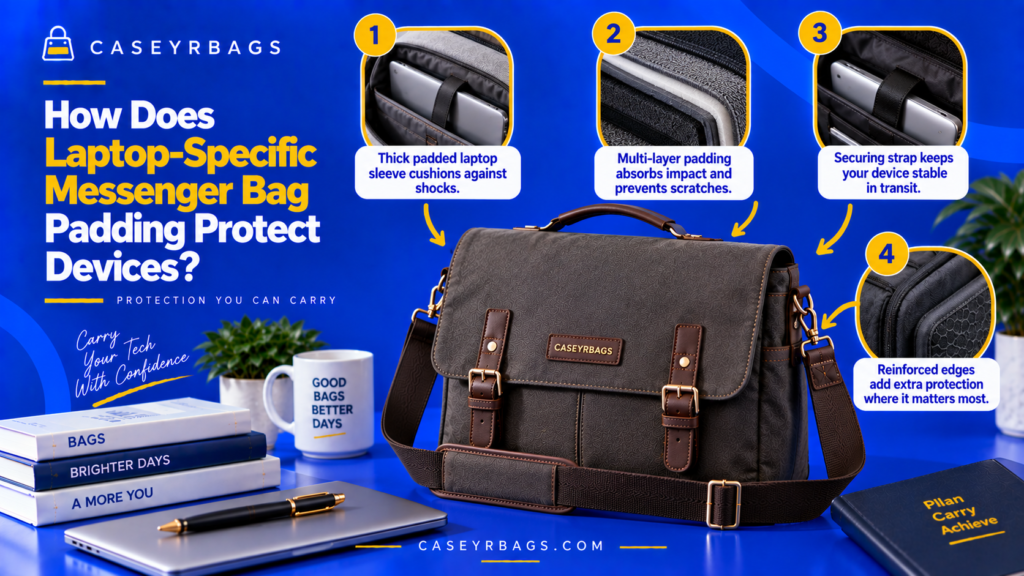
How Does Laptop-Specific Messenger Bag Padding Protect Devices?
Laptop-Specific Messenger Bag padding protects devices by placing compressible material between the laptop and the bag’s harder outer surfaces, seams, hardware, base, and surrounding contents. This cushioning can soften direct contact, reduce abrasion, limit some localized pressure, and help spread certain everyday carrying forces across a broader area.
Protection becomes more effective when padding works together with controlled sleeve fit, side and base coverage, device retention, separation from chargers or other hard objects, and enough bag structure to keep the laptop predictably positioned. Padding alone cannot guarantee protection from severe drops, crushing, water exposure, or every impact direction.
What Does Laptop-Specific Padding Actually Protect Against?
Laptop-specific padding creates a physical buffer between the device and the bag environment. During normal use, this buffer can reduce direct contact with panels, seams, hardware, and nearby contents.
Padding can also absorb or distribute some energy when the bag is placed down, bumped, or moved. The degree of protection depends on how much padding is present, where it is positioned, how it deforms under force, and whether the device remains correctly located within the sleeve.
Its role is therefore best understood as cushioning + separation + movement control, not as a universal barrier against device damage. Within the broader Messenger Bag system, padding is one protective layer rather than the entire category or protection system.
Which Everyday Risks Can Padding Help Reduce?
Padding can help reduce abrasion, hard-surface contact, minor bumps, localized pressure, internal item contact, and unnecessary movement inside the compartment.
Risk → padding response → protective effect. The useful outcome is reduced direct contact and more controlled positioning during ordinary carry, not elimination of every force.
Which Risks Can Padding Not Guarantee Protection Against?
Severe drops, crushing loads, sharp penetration, water ingress, and major impact events can exceed the protective role of ordinary padded construction.
Padding ≠ impact-proofing. Protective claims beyond ordinary cushioning require specific supporting evidence rather than inference from visible foam.
Why Does Device Protection Require More Than Padding?
Padding, fit, retention, separation, and bag structure must work together so the laptop stays within the cushioned zone and away from hard adjacent objects.
Padding is one layer of protection, not the entire protective system. For the broader structural comparison of padded and unpadded construction, see Padded vs Unpadded.
How Does Padding Cushion Direct Contact?
Compressible material changes the interface between the laptop and harder bag surfaces by deforming under ordinary contact.
What Happens When Padded Material Is Compressed?
Contact force causes the padding to deform, allowing some energy to be absorbed or spread through a softer and wider interface before reaching the device.
Contact force → padding deforms → some force spreads through a softer interface → direct hard-surface contact is reduced. Exact performance depends on verified material behavior.
Why Is Direct Hard Contact Different From Padded Contact?
A hard surface tends to concentrate contact in a smaller area, while a compressible layer creates a broader, softer interface around the device.
Hard surface → concentrated contact; compressible layer → broader, softer interface. The difference is mechanical contact management, not guaranteed damage prevention.
Why Does Cushioning Not Eliminate Impact?
Padding can reduce or redistribute some force, but sufficiently severe or poorly directed force can still reach the device through the sleeve, bag body, or surrounding contents.
Force reduction ≠ force elimination.
How Do Foam Properties Affect Device Protection?
Padding effectiveness depends on how the foam deforms, rebounds, maintains spacing, and works with the sleeve geometry—not on visible thickness alone.
How Does Softer Foam Behave?
Softer foam can conform around the device and cushion light contact but may compress easily when pressure rises or the sleeve is overfilled.
Greater conformity can improve surface contact while leaving less resistance to bottoming out in some conditions.
How Does Denser Foam Behave?
Denser or firmer foam can resist compression and maintain spacing more effectively, but it may conform less around the device.
Compression resistance is useful in some designs without making denser foam universally superior.
Why Can Layered Foam Be Useful?
Different foam layers can provide different deformation behaviors when the design combines softer and firmer materials or distinct zones.
Foam performance depends on density, resilience, thickness, and placement together.
| Foam Character | Typical Behavior | Protective Role | Main Limitation |
|---|---|---|---|
| Soft/compliant | Compresses easily | Surface cushioning | Can bottom out |
| Moderate-density | Balanced deformation | General cushioning | Design-dependent |
| Firmer/dense | Resists compression | Maintains spacing | Less conforming |
| Layered system | Multiple responses | Broader protection role | More thickness |
How Does Padding Thickness Affect Protection?
Padding thickness can increase available deformation distance, but it also consumes compartment space and does not reveal density, resilience, coverage, or fit.
How Can Additional Thickness Increase Cushioning Distance?
More compressible material can provide more deformation distance before the device reaches a harder surface in suitable constructions.
More compressible material → more deformation distance before hard contact. The benefit depends on the foam remaining functional rather than permanently compressed.
When Can Excessive Thickness Reduce Device Usability?
Excess padding can reduce sleeve space, make insertion tighter, increase bag depth, and compress nearby work items or accessory zones.
More protective structure → more separation ↔ less remaining slim Messenger capacity.
Why Is Thickness Alone a Weak Protection Metric?
Thickness alone does not reveal foam density, resilience, coverage continuity, sleeve fit, or how much the padding is compressed by the normal load.
Thicker padding ≠ automatically better protection.
How Does Sidewall Padding Protect a Laptop?
Front, rear, and sidewall padding create separation between broad device surfaces, edges, and the surrounding bag panels or seams.
How Does Front and Rear Padding Protect the Device Surfaces?
Front and rear padding separates the laptop from bag panels, reduces direct contact with exterior pressure, and helps isolate it from nearby contents.
Broad-face coverage reduces direct surface contact when the padding remains positioned and uncompressed.
How Does Side Padding Protect Device Edges?
A padded perimeter can reduce direct edge contact with seams, side panels, and nearby structure when coverage continues around the device.
Padded perimeter → reduced direct edge contact, depending on coverage continuity.
What Happens When Padding Coverage Is Incomplete?
Unpadded corners, the upper edge, side seams, or the sleeve opening can become weaker zones even when broad front and rear panels are thickly padded.
Padding coverage matters as much as padding thickness.
How Does Base Padding Protect the Device?
The base needs separate evaluation because setting the bag down can send contact force upward through the bottom structure toward the device.
What Happens When the Messenger Bag Is Set Down?
The outer base contacts the surface first, and force can travel upward through the base structure toward the laptop compartment.
Bag base contacts surface → force can travel upward through base structure.
How Can Padded Base Material Reduce Direct Laptop Contact?
Base padding creates separation and cushioning between the device edge or sleeve bottom and the harder outer base.
Base padding → separation + cushioning between device edge and outer base.
Why Is Bottom Padding Alone Not Enough?
A device can still be exposed through the sides, corners, front and rear panels, seams, or other internal items.
Base padding protects one direction of contact, not the entire device.
How Does a Suspended Laptop Sleeve Add Protection?
A suspended sleeve adds physical bottom clearance by ending the device compartment above the lowest exterior surface of the bag.
What Is a Suspended Sleeve?
A suspended sleeve is a device compartment whose lower edge ends above the outer bag base so a structural gap remains beneath the laptop.
Device compartment ends above outer bag base → a clearance gap remains beneath the device.
How Can Suspension Reduce Direct Base Impact?
When the bag base contacts the ground or another surface first, the laptop edge is not seated directly against the lowest exterior surface.
Bag base contacts first → device edge remains separated from the lowest exterior point.
Why Is a Suspended Sleeve Not Drop-Proof?
Severe force can still transfer through sleeve structure, side panels, other contents, or hardware even when bottom clearance exists.
Bottom clearance ≠ guaranteed drop protection.
| Construction | Layer Sequence | Primary Benefit | Boundary |
|---|---|---|---|
| Standard padded base | Laptop → padding → outer base | Cushioning + separation | Device still near lowest base |
| Suspended sleeve | Laptop → sleeve base → clearance gap → outer base | Additional bottom clearance | No guaranteed drop protection |
How Do Corner & Edge Protection Affect Laptop Safety?
Corners and edges concentrate contact into smaller areas, so perimeter coverage can be as important as broad-face padding.
Why Are Corners Structurally Important Protection Zones?
Corner contact concentrates force into a smaller area than broad flat-surface contact, making those locations important coverage zones.
The concern is concentrated contact geometry rather than a prediction of specific damage.
How Can Padded Edge Wrapping Improve Coverage?
Padding that wraps around the device perimeter can reduce seam contact and keep device edges separated from harder bag structure.
Perimeter coverage supports more continuous cushioning around the device.
When Can Sleeve Seams Create Weak Protection Zones?
Thin seam allowances, hardware near a corner, or heavily compressed foam can create areas where cushioning is reduced or interrupted.
Continuous coverage is more useful than thick padding concentrated only on broad panels.
How Does Device Fit Affect Padding Performance?
The laptop must fit closely enough to stay inside the intended cushioned zone without compressing the padding so tightly that the sleeve loses functional space.
What Happens When the Sleeve Is Too Loose?
The device can slide, corners can approach sleeve edges, and contact positions can change unpredictably during movement.
Too-loose fit → more movement → less predictable padding contact.
What Happens When the Sleeve Is Too Tight?
Padding can remain compressed, insertion can become difficult, and pressure can increase against device edges or case corners.
Too-tight fit → pre-compressed foam + retrieval friction → weaker functional cushioning margin.
What Does Controlled Fit Look Like?
A controlled fit allows easy insertion, limited excess movement, no forced stretching, and normal removal.
Device fit supports padding performance; fit itself is not protection.
| Sleeve Fit | Device Movement | Padding Condition | Main Risk |
|---|---|---|---|
| Too loose | High | Uncontrolled spacing | Sliding/contact |
| Controlled | Low–moderate | Functional | Predictable |
| Too tight | Low | Compressed | Pressure/retrieval difficulty |
How Does a Retention Strap Support Device Protection?
Retention controls the laptop’s location inside the padded zone, complementing cushioning without replacing it.
What Does a Retention Tab or Strap Do?
A retention feature can limit upward movement, help keep the device inside the sleeve, and maintain its intended position during ordinary carry.
Retention → reduced device movement → more stable sleeve position.
How Does Retention Work With Padding?
Padding provides cushioning around the device while retention helps keep that device positioned within the cushioned area.
Padding cushions while retention controls location.
Why Does Retention Not Create Impact Protection by Itself?
A strap or tab does not itself absorb severe forces or create certified impact resistance.
Movement control ≠ impact-proofing.
How Does Separation From Chargers & Accessories Protect the Device?
Internal organization can protect the device zone by keeping hard accessories from creating concentrated pressure against the padded sleeve.
Why Can Hard Accessories Create Pressure Points?
Chargers, adapters, power banks, and compact electronics can press against the sleeve and create localized pressure at small contact areas.
Hard object pressed against laptop zone → localized contact → sleeve wall compression.
How Does a Separate Accessory Zone Help?
A divider or dedicated pocket creates physical separation between the laptop sleeve and hard accessories.
Physical divider/pocket → reduced direct contact between device and hard accessories.
Why Should Accessory Placement Remain Controlled Even With Padded Walls?
External sleeve padding does not prevent hard objects inside the main chamber from continuously pressing inward against the device zone.
External padding does not prevent internal hard-object pressure.
How Does Internal Load Placement Affect Laptop Protection?
The rest of the Messenger Bag load can compress, distort, or shift the padded laptop compartment even when the sleeve itself is well designed.
How Can Bulky Contents Press Into the Laptop Sleeve?
Bulky contents can create inward panel pressure, reduce cushioning space, and compress the device zone from the outside.
Surrounding load → sleeve compression → reduced functional deformation range.
How Can Uneven Load Create Device Contact?
A heavy item concentrated on one side can distort the bag and sleeve geometry, shifting the device toward seams or harder structure.
Uneven load → geometry distortion → less predictable device separation.
Why Should the Device Zone Remain Structurally Clear?
A padded compartment protects best when surrounding contents do not continuously compress it.
Keeping the sleeve zone clear preserves both fit and cushioning behavior.
How Does Messenger Bag Structure Support the Padded Sleeve?
The surrounding bag body affects whether the padded sleeve remains upright, separated, and correctly positioned around the device.
How Can a Semi-Structured Body Support Device Protection?
A semi-structured body can stabilize sleeve position, limit panel collapse, and keep the device zone separated from neighboring contents.
Stable body geometry supports the padding by preserving the compartment shape around it.
How Can an Overly Soft Body Affect the Sleeve?
A very soft body can bend with surrounding load, allow hard objects to press inward, and change the device’s position inside the sleeve.
Soft structure is not automatically poor; the question is whether it still keeps the padded zone functional.
Does a Rigid Exterior Automatically Provide Better Protection?
No. A rigid shell can preserve shape while still depending on internal cushioning, fit, coverage, and impact direction.
Rigid shell ≠ guaranteed device protection.
How Does the Main Flap or Closure Affect Laptop Protection?
Closure keeps the device inside the organized compartment system, while padding remains responsible for cushioning and separation.
How Does a Closed Messenger Bag Help Contain the Laptop?
A closed flap or main opening keeps the device inside the intended compartment system during normal movement and handling.
Closed bag → organized containment maintained → device remains within the planned sleeve zone.
How Can Overfilling Interfere With Device Protection?
Overfilling can create flap tension, compress the sleeve, misalign closure hardware, and press surrounding contents against the laptop.
Closure pressure can therefore signal that the padded zone is being mechanically crowded.
Why Does Reliable Closure Not Equal Device Protection?
Closure manages containment, while padding manages cushioning and separation around the device.
Bag closure controls containment; padding controls cushioning.
How Does Overfilling Reduce Padding Effectiveness?
Overpacking can pre-compress the padded system before any additional contact occurs, reducing the deformation space available for cushioning.
How Does Overpacking Compress Sleeve Padding?
Surrounding contents press inward and can leave the foam partially compressed even while the bag is simply being carried.
Overfilling → sleeve pre-compression → less remaining deformation range.
How Can This Reduce Cushioning Space?
Pre-compressed foam has less room left to deform when additional contact occurs.
Pre-compressed padding → less remaining deformation range. No universal quantitative reduction should be assumed.
What Indicates the Device Compartment Is Over-Compressed?
Difficult device removal, bulging outer panels, visibly flattened sleeve walls, or closure under tension indicate that the sleeve lacks functional space.
A padded sleeve needs functional space around it to perform as designed.
How Does Padding Protect Against Scratches & Abrasion?
Soft interior surfaces can reduce rough-surface contact, but abrasion control is different from impact cushioning.
How Does Lining Isolate the Laptop Surface?
Soft inner material reduces direct contact between the device surface and rougher bag components or structural seams.
Soft lining → lower direct abrasive contact during ordinary insertion, removal, and movement.
How Can Dirt or Debris Undermine Lining Protection?
Particles inside the sleeve can create unwanted contact even when the lining itself feels soft.
Cleanliness matters because the protective interface includes both the lining and anything trapped against it.
Why Is Abrasion Protection Different From Impact Protection?
Soft lining can reduce surface rubbing, while cushioning foam deforms under contact; neither creates a universal scratch-proof or impact-proof guarantee.
Soft lining ≠ impact cushioning, and cushioning foam ≠ scratch-proof guarantee.
How Does Padding Respond to Repeated Vibration & Movement?
Controlled fit and soft contact can reduce free movement inside the sleeve, but ordinary motion control should not be described as certified vibration isolation.
How Can Snug Padding Reduce Repeated Device Movement?
Controlled fit plus soft contact can reduce the free space available for sliding and repeated contact inside the compartment.
Controlled fit + soft contact → less free movement inside sleeve.
Why Can Loose Fit Increase Repeated Contact?
Excess clearance can allow sliding, edge contact, and repeated movement against sleeve walls during normal carry.
Loose fit → more movement opportunity → more variable contact position.
Can a Messenger Bag Be Called Vibration-Proof?
No. Reduced internal movement does not establish certified vibration isolation or resistance to all vibration conditions.
Reduced internal movement ≠ certified vibration isolation.
How Does Padding Wear Affect Protection Over Time?
Repeated compression and use can flatten foam, shift padding, damage seams, and reduce the coverage that existed when the bag was new.
What Does Permanent Foam Compression Look Like?
Flattened zones, reduced rebound, or visibly thin sections indicate that the material may no longer return fully to its original shape.
Permanent compression → less functional cushioning distance in the affected zone.
How Can Worn Seams Affect Padding Coverage?
Damaged seams can allow foam to shift, padding layers to separate, or corners and edges to become more exposed.
Coverage gaps can appear even when the visible outer sleeve still looks intact.
When Should the Sleeve Be Treated as Degraded?
Collapsed padding, torn lining, exposed hard components, damaged retention, or lost base separation indicate that the current sleeve no longer matches its original protective condition.
Protection should be evaluated from current condition, not original appearance.
| Observed Change | Check | Likely Consequence |
|---|---|---|
| Foam flattened | Rebound / thickness | Reduced cushioning distance |
| Seam damaged | Padding position | Coverage shift |
| Sleeve stretched | Device movement | Less controlled fit |
| Base clearance lost | Sleeve suspension | More direct base contact |
| Retention worn | Tab/strap function | More device movement |
How Does Laptop Size Affect Padding Performance?
A sleeve designed around one device range can lose its intended padding relationship when the laptop is significantly larger or smaller than the usable compartment.
How Does an Oversized Laptop Affect the Padded Sleeve?
An oversized laptop can compress side padding, stress seams, make closure difficult, and reduce useful edge coverage.
Oversizing changes both fit and padding condition rather than only insertion effort.
How Does an Undersized Laptop Affect Padding?
An undersized laptop can move more freely, shift position, and bring corners into less predictable contact with the sleeve.
Extra space can weaken controlled positioning even when insertion is easy.
Why Should Actual Device Dimensions Be Verified?
Advertised screen size does not fully describe width, height, thickness, or the additional geometry of a protective case.
Advertised screen size ≠ complete laptop dimensions.
Can a Protective Laptop Case Work With Messenger Bag Padding?
A separate laptop case can add another layer of separation or cushioning, but it also changes the dimensions the padded sleeve must accept.
How Can a Case Add Separation or Cushioning?
A protective case can add an exterior layer, edge coverage, or surface separation depending on its construction.
The benefit depends on the case design and should not be treated as a universal extra-protection guarantee.
How Can a Case Make the Padded Sleeve Too Tight?
Case thickness plus laptop dimensions plus sleeve padding can consume the available compartment clearance and leave the foam compressed.
More layers can improve separation while simultaneously reducing functional sleeve space.
How Should Combined Protection Be Evaluated?
Laptop + case + sleeve should still allow normal insertion, normal removal, uncompressed functional padding, and proper closure.
More layers ≠ automatically better if the fit becomes excessively compressed.
When Does Padding Become Too Bulky for a Slim Messenger Profile?
Protective structure must remain compatible with the bag’s shallow work-item role rather than consuming so much depth that the Messenger profile stops functioning efficiently.
How Does Thicker Padding Consume Internal Capacity?
Padding occupies part of the bag depth, leaving less space for the laptop itself, documents, notebook, and accessories.
More padding thickness → more potential cushioning distance ↔ less usable compartment space.
How Can Excessive Padding Affect Work-Item Organization?
Thick sleeve walls can reduce document capacity, shrink accessory zones, and expand the packed profile even before the normal load is added.
Protective structure should not crowd out the bag’s intended work-item function.
What Defines Useful Padding Balance?
Useful balance means enough coverage and cushioning to support the device without consuming so much space that normal work-item carry becomes impractical.
The best balance is functional rather than universally maximum.
How Can Weak Laptop Padding Be Diagnosed?
Weak protection should be traced to missing coverage, poor fit, compressed padding, failed separation, or surrounding-load pressure rather than judged from appearance alone.
What if the Laptop Contacts a Hard Bag Surface?
Check for missing side padding, collapsed base padding, exposed seams or hardware, and sleeve misalignment.
Hard contact indicates a gap in coverage or separation that should be identified directly.
What if the Laptop Moves Excessively?
Check an oversized sleeve, missing retention, compressed padding, or poor compartment shape.
Excess movement usually points to controlled-fit or retention failure rather than insufficient padding thickness alone.
What if the Sleeve Feels Protective When Empty but Not When Loaded?
Check adjacent accessory pressure, overfilling, bag-body collapse, and closure compression.
Loaded conditions can undermine an otherwise adequate empty sleeve by pre-compressing or distorting the padded zone.
How Should Laptop Messenger Bag Padding Be Evaluated?
Real-use evaluation should inspect the full padded zone before insertion and then test fit, compression, separation, closure, and access with the actual laptop and normal work load.
What Should Be Inspected Before Inserting the Laptop?
Inspect front and rear padding, sidewall coverage, base padding, corner coverage, suspended bottom clearance, lining, and retention.
These checks establish whether the intended protective zones are present and intact before the device changes sleeve geometry.
What Should Be Checked After Inserting the Laptop?
Check sleeve fit, device movement, padding compression, remaining clearance, and whether insertion and removal remain normal.
Post-insertion behavior reveals whether the device is too large, too loose, or compressing the protective structure.
Which Sequence Should Determine Protective Fit?
- Verify the laptop’s actual dimensions.
- Inspect padding coverage.
- Check the sleeve base.
- Identify whether bottom clearance exists.
- Insert the laptop without forcing it.
- Check side and corner clearance.
- Engage any retention feature.
- Add the normal documents and accessories.
- Keep hard accessories in separate zones.
- Close the Messenger Bag normally.
- Check for excessive sleeve compression.
- Carry the bag normally.
- Reopen it and remove the laptop.
- Confirm that padding returns to its normal shape and the device remains easy to access.
Use the sequence in order so dimensions, coverage, base structure, and bottom clearance are checked before the laptop is inserted and retained.
Then add normal documents and accessories, keep hard objects separated, close and carry normally, reopen, remove the laptop, and confirm the padding returns to normal shape.
How Can Laptop-Padding Protection Mismatches Be Avoided?
Protection mismatch is avoided by refusing to use visible padding thickness, physical device fit, or laptop-specific labeling as a stand-alone protection judgment.
Why Is “Choose the Thickest Padding” a Weak Rule?
Density varies, coverage varies, excessive thickness can reduce fit, and even thick foam can remain compressed or bottom out under certain conditions.
Thicker padding ≠ automatically better protection.
Why Is “If the Laptop Fits, It Is Protected” Also Weak?
Physical fit says nothing by itself about cushioning, edge coverage, base separation, adjacent-object pressure, or the condition of the padding.
Device fit ≠ device protection.
What Should Be Verified Before Treating the Messenger Bag as Laptop-Protective?
Verify actual device dimensions, front/rear and side coverage, corners, base cushioning or separation, controlled sleeve fit, retention, lining, and current foam condition.
Also confirm hard-accessory separation, normal loaded closure, no chronic sleeve compression, proper case-inclusive fit where relevant, and realistic protection claims that do not exceed the evidence.
- Laptop dimensions are verified.
- Screen size is not used as the only fit measurement.
- Sleeve dimensions match the actual laptop.
- Device fits without forcing.
- Sleeve is not excessively loose.
- Front padding covers the device face.
- Rear padding covers the opposite face.
- Side edges receive useful cushioning.
- Corners are not left unnecessarily exposed.
- Base includes useful cushioning or separation.
- Suspended sleeve clearance is identified where present.
- Suspended construction is not called drop-proof.
- Foam remains resilient rather than permanently flattened.
- Padding thickness is not treated as the only quality measure.
- Thicker padding is not automatically treated as better.
- Retention limits unnecessary device movement where provided.
- Retention is not confused with impact protection.
- Hard chargers and accessories remain separated from the device.
- Adjacent contents do not continuously compress the laptop sleeve.
- Main bag is not overfilled.
- Closure does not force excessive pressure against the laptop.
- Lining remains clean and intact.
- Padding seams remain intact.
- Device case is included in fit evaluation where normally used.
- Physical fit is not confused with verified protection.
- Padded construction is not described as crush-proof, waterproof, or impact-proof without supporting certification.
- Final protection is evaluated as padding + coverage + fit + retention + separation + bag structure working together.
Conclusion
Laptop-Specific Messenger Bag padding protects devices by creating compressible separation between the laptop and the bag’s outer surfaces, base, seams, hardware, and surrounding contents. Properly positioned padding can reduce direct contact, soften some everyday impacts, limit abrasion, and help keep the device more predictably located inside the bag.
Laptop-Specific Messenger Bag padding protects best when cushioning material surrounds the relevant device surfaces, the sleeve fits without excessive movement or compression, the base and edges remain separated from hard contact, and surrounding work items do not overwhelm the padded compartment—while still recognizing that padding reduces risk rather than guaranteeing damage prevention. Thickness, appearance, laptop-specific labeling, or physical fit alone cannot establish verified protective performance.
FAQs
No. More thickness can increase available cushioning distance, but thickness alone does not reveal foam density, resilience, coverage, sleeve fit, or compression under the normal load.
Excess padding can also reduce usable space or remain pre-compressed. Protective performance depends on the complete padded system.
A suspended sleeve can create additional separation between the laptop and the bag’s lowest exterior base, while ordinary padding cushions the device closer to that base.
Both approaches can be useful depending on construction. Bottom clearance ≠ guaranteed drop protection, and severe forces can still transfer through other parts of the bag.
No. Padding can reduce some ordinary contact and impact transfer by adding cushioning and separation around the laptop.
Severe drops, crushing, exposed corners, poor fit, worn foam, or hard internal objects can still transmit significant force. Padded construction therefore reduces risk rather than guaranteeing damage prevention.